話說PostgreSQL的Console讓我覺得有一些地方不方便,創造欄位後便不可以介面式的移動位置、更改欄位類型等諸多限制,尤其是當我想要二次更改時,就只好刪除重建,但是這樣一來位置又會走掉,所以常常會為了更改一個欄位,就毀掉大半表格又重建(當然,實際上欄位位置不重要,一樣可以使用,但我就是希望看得舒服@@)。
所以搜尋和嘗試了一小段時間,找到了可以用SQL語法變更欄位類型的方式。
例如,在名為"test"的schema內,將一個名為"check_time"的欄位更改為"時間且不含時區"的格式:
ALTER TABLE msoc.test
ALTER COLUMN check_time TYPE timestamp without time zone
USING check_time::timestamp without time zone
例如,在名為"test"的schema內,將一個名為"id"的欄位更改為"字串"的格式:
ALTER TABLE msoc.test
ALTER COLUMN id TYPE varchar
USING id::varchar
主要是參考下列網址內的資訊:
https://www.postgresql.org/docs/9.1/static/sql-altertable.html
TYPE的部分,有時會和在介面內創造時的名稱不一樣,例如在介面內是"character varying",在SQL語法內是"varchar",所以要改變類別時,最好去上列網址內看看想要改變的類別在TYPE處該怎麼寫。
2016年6月29日 星期三

2016年6月16日 星期四
在Eclipse內使用PostgreSQL資料庫
最近工作需要在Eclipse內和PostgreSQL資料庫相連,因此這邊記錄一下使用方式,免得自己以後要用時又得東找西找的。
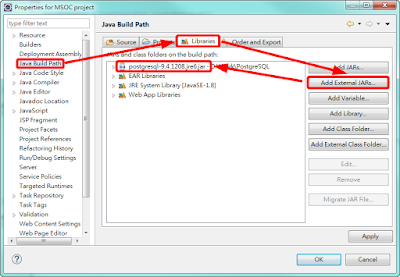
首先將PostgreSQL的JAR檔匯入到Eclipse內:
接著在Eclipse內撰寫:
首先將PostgreSQL的JAR檔匯入到Eclipse內:

接著在Eclipse內撰寫:
import java.sql.*;

public class MainProcess {

    public static void main(String[] args)
    {
        Connection tempConnection = null;
        Statement tempStatement = null;
        ResultSet tempResultSet = null;
        String tempAction = "";
        String tempSentence = "";

        switch( tempAction )
        {
            case "Select":
                tempSentence = "SELECT * FROM Schemas.Tables WHERE account = 'Kimdick' AND password = '123'";

                break;
            case "Insert":
                tempSentence = "INSERT INTO Schemas.Tables ( account, password ) VALUES ( 'Kimdick', '123' )";

                break;
            case "Update":
                tempSentence = "Update Schemas.Tables SET password = '123', email = 'Kimdick@mail' WHERE account = 'Kimdick'";

                break;
            case "Delete":
                tempSentence = "DELETE FROM Schemas.Tables WHERE account = 'Kimdick'";

                break;
        }

        try
        {
            Class.forName( "org.postgresql.Driver" );
            tempConnection = DriverManager.getConnection( "jdbc:postgresql://127.0.0.1:5432/datastream", "postgres", "1234" );
            tempStatement = tempConnection.createStatement();
            tempStatement.executeQuery( tempSentence );

            if( tempResultSet != null )
            {
                tempResultSet.close();
                tempResultSet = null;
            }

            if( tempStatement != null )
            {
                tempStatement.close();
                tempStatement = null;
            }

            if( tempConnection != null )
            {
                tempConnection.close();
                tempConnection = null;
            }
        }
        catch( Exception e )
        {
            e.printStackTrace();
        }
    }
}
DriverManager.getConnection( "jdbc:postgresql://127.0.0.1:5432/datastream", "postgres", "1234" );
這裡是DriverManager.getConnection( "jdbc:postgresql://資料庫IP:Port/Database", 帳號, 密碼 );
訂閱:
文章 (Atom)